Make your first backup
Run Pahest, answer one question, and open your sessions in the browser.
A backup is one command and one answer. This page shows a real run on a Mac with about 1,050 sessions. Only the user name is changed, to you.
Start Pahest
Open the Terminal app, type pahest, and press Enter. Pahest shows the start screen. It copies nothing before you answer its question.
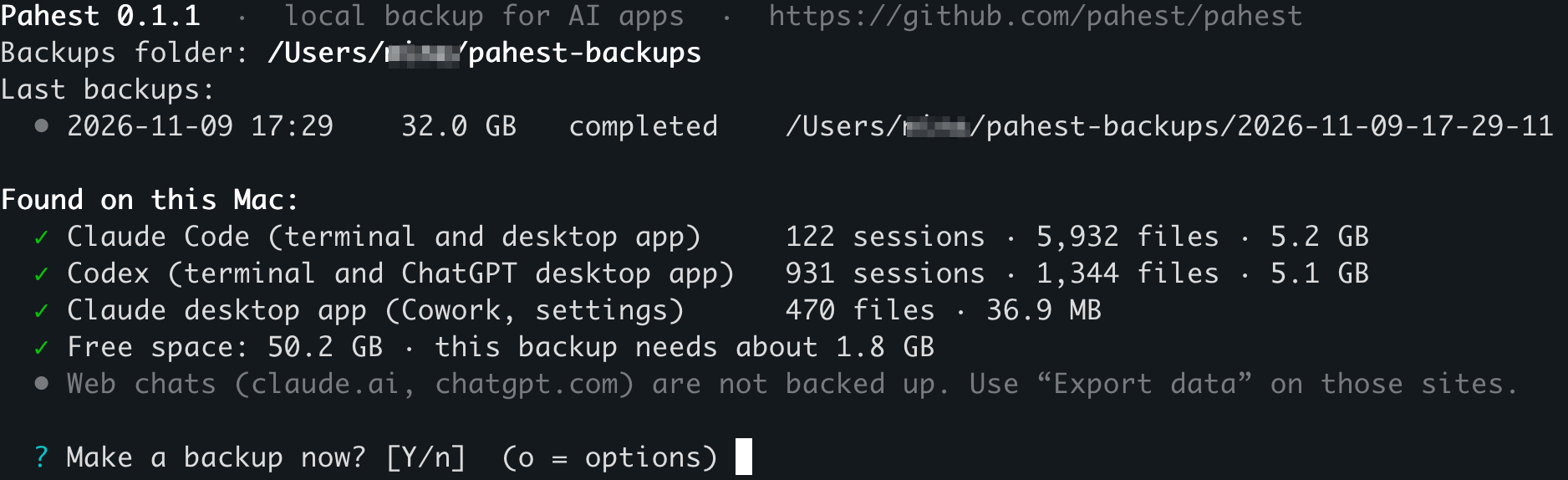
| Line | What it tells you |
|---|---|
Backups folder |
The folder for your backups. |
Last backups |
Your last backups, with the time, the size and the result. |
Found on this Mac |
Each app that Pahest can back up, with the number of its sessions and files. |
Free space |
The free space on the disk, and the minimum new space for this backup. |
Answer the question
| Key | Result |
|---|---|
Enter, or y |
The backup starts. |
n |
Pahest stops and prints Cancelled. Nothing was backed up. |
o |
Pahest shows the options. |
Read the result
Press Enter. Pahest shows its progress for each app and asks no more questions. These are the first and the last lines of the run:
  ? Make a backup now? [Y/n]  (o = options)

  • The backup starts now. Press Ctrl+C to stop it at any time; what is saved by then is kept.

── Claude Code ─────────────────────────────────────────────────────────────────────────────────────
  Claude Code        ████████████████████████ 100%  5,984/5,984  5.3 GB/5.3 GB
  ✓ local sessions: ok · 124 sessions · 5,984 files · 5.3 GB
    → /Users/you/pahest-backups/2026-11-11-19-23-42/claude-code

…

── Verification ────────────────────────────────────────────────────────────────────────────────────
  Verifying          ████████████████████████ 100%  29,636/29,636  32.7 GB/32.7 GB
  ✓ 29,636 files (32.7 GB) read back and matched; 698 JSON, 1,667 JSONL, 931 compressed, 5 databases, 17,704 images checked

── Done ────────────────────────────────────────────────────────────────────────────────────────────
✓ Backup completed in 23:21: 29,637 files, 32.7 GB (3.7 GB written in full, the rest stored as clones).

  Backup folder:  /Users/you/pahest-backups/2026-11-11-19-23-42
  Your chats:     file:///Users/you/pahest-backups/2026-11-11-19-23-42/index.html
  Report:         file:///Users/you/pahest-backups/2026-11-11-19-23-42/report.html
  All backups:    file:///Users/you/pahest-backups/logs/index.html
  To open a link, hold Cmd and click it (in Apple's Terminal: hold Cmd and double-click).
This run took 23 minutes because the Mac did other work at the same time.
The first line of the part Done gives the result:
| Text | Meaning |
|---|---|
Backup completed |
The backup has all files and no problems. |
Backup completed with problems |
A part is missing. See Problems and limits. |
Open your sessions
Hold Cmd and click the address in the line Your chats. In the Terminal app from Apple, hold Cmd and double-click it. The list of your sessions opens in your browser.
You can also open the page from Finder:
- Run
open ~/pahest-backups. - Open the folder with the newest date.
- Double-click
index.html.
Find a session shows what you can do on that page.
Stop a backup
Press Ctrl+C. Pahest stops and keeps the files that it saved before you stopped it. It adds -interrupted to the name of that backup folder. To get a full backup, run pahest again.
Make the next backup
Run pahest again. Each run makes a new, full backup in a new folder. The name of the folder is the date and time of the start.