See all pictures
One page with every picture from your sessions, with filters and a large view.
The Pictures page shows every picture from every session. To open the page, click Pictures in the top bar of a page.
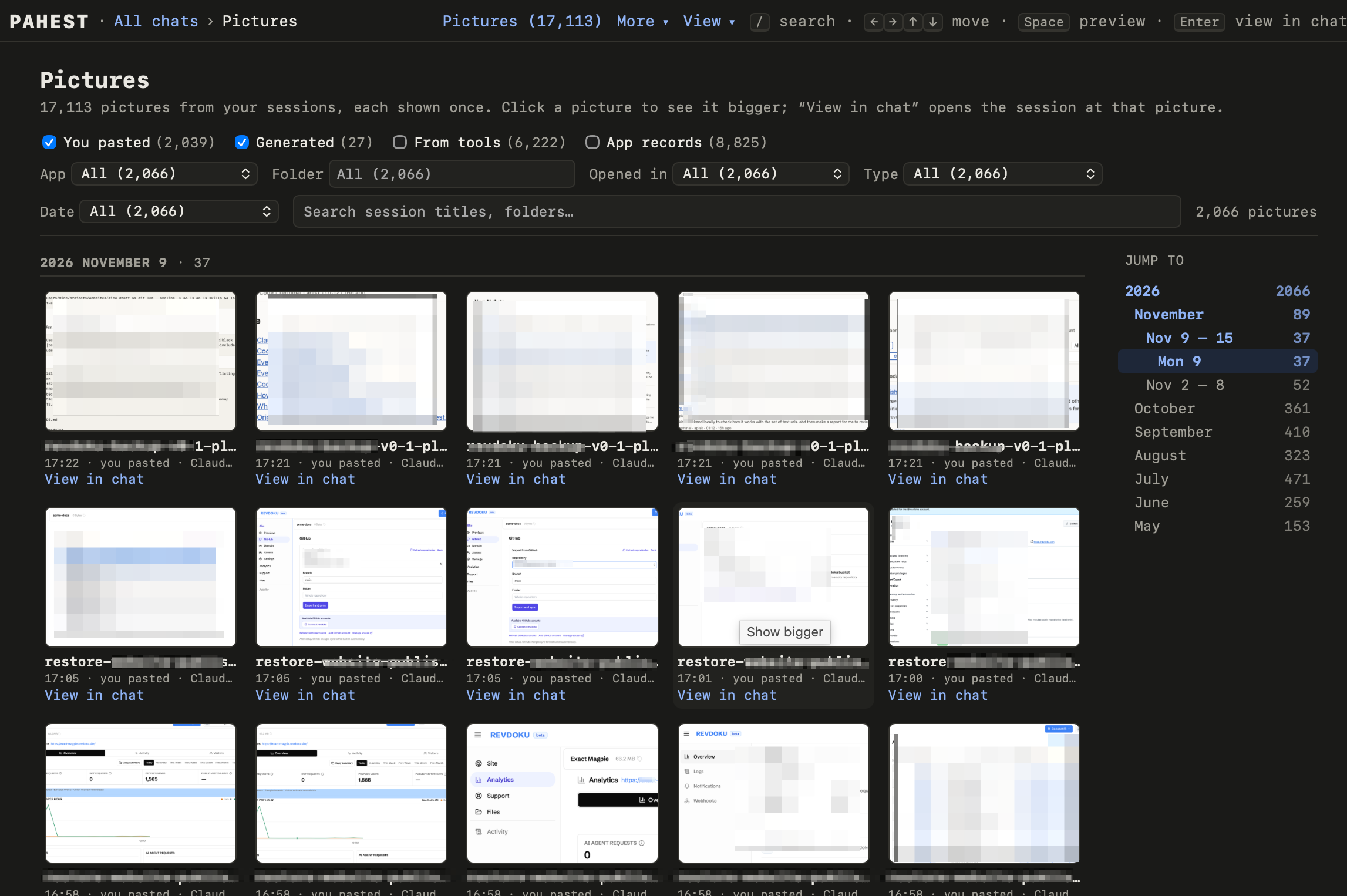
Choose the pictures
Four checkboxes choose the kinds of pictures. The page starts with You pasted and Generated.
| Checkbox | Pictures |
|---|---|
| You pasted | Pictures that you pasted into a session. |
| Generated | Pictures that the AI made. |
| From tools | Pictures that the AI looked at, for example a screenshot from a tool. |
| App records | Pictures from the records of the app, for example the browser screenshots of Codex. |
The page also has the filters and the search box of the list of sessions. Find a session shows how to use them.
Look at a picture
- Click a picture to see it large.
- Press the left or the right arrow key to go to the previous or the next picture.
- Press Space or Esc to close the picture.
- Click View in chat to open the session at that picture.
Use the keyboard
| Key | Result |
|---|---|
/ |
Go to the search box. |
| Arrow keys | Move from picture to picture. |
| Space | Show the selected picture large, or close it. |
| Enter | Open the session at the selected picture. |